
2026-10-14
Weekly Progress Reports to Parents Without Building a Parent App
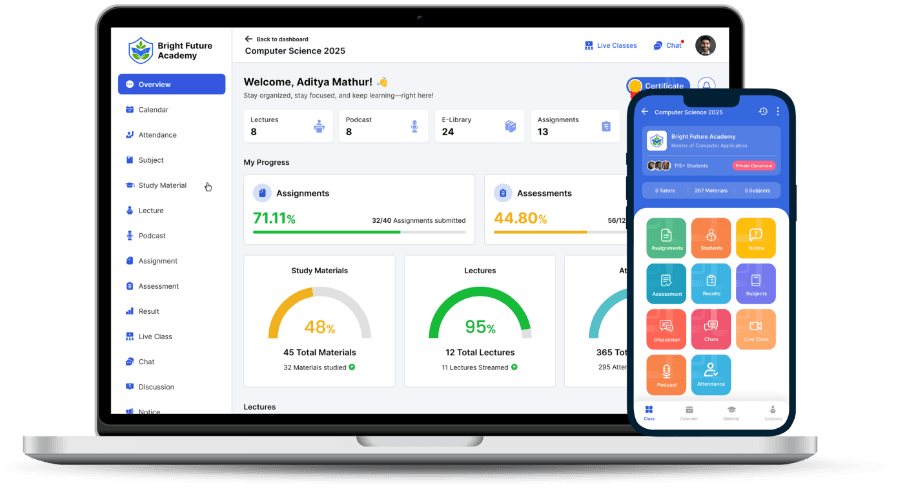
You can send parents a useful weekly progress report without commissioning a parent app. Most coaching institutes need three things: one place where parents check attendance and test results themselves, a short summary email once a week, and an easy way to call or WhatsApp the institute when something looks wrong.
This guide is for owners of coaching institutes, tuition centres and schools who are tired of the same phone calls and want parents informed without hiring someone to type reports. It covers what parents actually want to know, which channels are realistic in India, how to run the routine without extra staff work, and how The Academix parent portal handles it.
Why do parents keep calling the front desk?
Listen to the calls your front desk takes in a week and most of them are the same few questions. Was my daughter in class on Tuesday? How did he do in Sunday's test? Is there homework due? Has the schedule changed for the holidays? None of these need a teacher. They need a record the parent can read.
The deeper problem is silence. A family pays a large fee in one or two instalments and then hears nothing until the parent-teacher meeting or the result. If a student has been skipping weekly tests since November and the parent finds out in February, the parent does not blame the student alone. They feel the institute hid it, and they say so to other parents. Many parent complaints are less about the teaching than about finding out too late.
A regular, predictable update fixes both. Parents stop calling for routine answers, and when a result is bad it is not a surprise, because they have watched the trend for weeks.
What should a weekly progress update contain?
Keep it to what a parent can act on. Use this as a checklist when you design your update, whatever channel carries it:
- Attendance: classes attended this week and the running total, so a parent sees the trend and not just one day
- Test results published this week: the score and the subject-wise breakdown, so a parent knows physics went well and chemistry did not
- Assignments: which were submitted and which are still pending
- What is coming up in the next two weeks: tests, live classes, assignment due dates and holidays
- Notices the institute sent to the class or to everyone
- One clear way to reach a person at the institute, and who that person is
Leave out what causes friction at home without helping. Rank in a small batch can embarrass a child for a difference of two marks. A minute-by-minute log of which lectures a child watched reads as surveillance and starts arguments. Comparisons with named classmates should never go to parents. If you do share rank, share it only where the batch is large enough for it to mean something.
Which channel works: a parent app, email, a portal or WhatsApp?
Every institute owner has been told they need a parent app. Before paying for one, compare the realistic options:
- A separate parent app: parents must find it, install it and keep it updated. Many will not, especially a second parent or a grandparent who helps. It is expensive to build and maintain for what is mostly reading.
- A read-only web portal: opens in the phone browser a parent already uses, with nothing to install. It needs a sign-in, and the institute has to invite parents once.
- A weekly email digest: arrives on its own, needs no effort from the parent, and leaves a record. It only reaches parents whose email you have, and some check email rarely.
- WhatsApp click-to-chat: a button that opens a normal WhatsApp conversation with the institute's number. Free, familiar, and good for questions. It does not send anything automatically.
- Automated WhatsApp or SMS broadcasts: the most visible option, and the hardest to run well. Automated WhatsApp needs a Business API provider, pre-approved message templates and per-message charges. Forwarding PDFs from the owner's personal phone to a broadcast list does not scale past a few batches.
For most institutes the practical answer is the portal plus the email: the portal for parents who want to check, the Sunday email for parents who will not, and a WhatsApp button for anyone with a question.
How do you run a weekly update without adding staff work?
Weekly reports usually die by Diwali, because someone had to compile them by hand. A routine that lasts follows a few rules:
- The data comes from records teachers already keep: attendance marked in class, tests taken in the system, assignments submitted online. If anyone types a report on Friday evening, it will stop.
- It goes out at a fixed time. Sunday evening works for most families, because parents are home and the week's tests are done.
- One named person handles follow-up calls, so a worried parent does not bounce between three teachers.
- Parents hear about it at admission and at the first parent-teacher meeting, so the first email is expected rather than ignored.
- You start with one batch, fix what confuses parents, then switch it on for everyone.
What should a parent portal do, and what should it not do?
A parent portal works best when it is narrow. Parents should be able to look, not edit. Open chat between parents and teachers sounds friendly, but it turns into teachers answering messages at 11 PM and arguments about marks in writing. A better pattern is read-only screens, a phone or WhatsApp route to the front desk, and an optional way to ask for a call back when something needs a conversation.
The institute should also control what parents see. A school may want attendance and homework visible, while a NEET or JEE institute may want results front and centre and rank hidden. Those choices belong to the institute, not the software vendor.
How does The Academix parent portal handle weekly updates?
The Academix parent portal is a read-only website at parents.theacademix.com. A parent signs in with their mobile number and password and sees their child's attendance, test results with the subject-wise breakdown, assignments submitted or pending, notices, the next two weeks of classes, tests, due dates and holidays, and progress charts by subject and by month. It shows the institute's own name, logo and colours, and it reads from the same records teachers already keep, so nobody types anything twice.
Every Sunday at 6 PM IST, each parent with an email address on file gets one summary email covering all their children at the institute. The institute can switch the digest off. If the institute uses early-warning alerts, it can also choose to copy parents on alerts for low attendance, a falling score or a missed test.
Every parent screen has a WhatsApp button and a call button that open a conversation with the institute's own number. If the institute turns it on, a parent can request a call back about results, attendance, fees or something else, and the request lands in a staff queue.
What the portal does not do: there is no parent mobile app, parents cannot message teachers, it shows no fee balances and takes no payments, it sends no SMS or automated WhatsApp messages, and it sends no push notifications to parents. The portal is included in every plan. Plans start from ₹1,500/month; the final price is quoted to your requirements.
How do you switch it on for your institute?
- An owner turns the portal on in Parent Portal settings and chooses which sections parents can see. It is off until someone switches it on.
- Staff add up to three parents or guardians on each student's Parents tab. Each invite is a one-time link valid for 30 days, usually sent over WhatsApp.
- For a whole institute, staff download a CSV of student names, parent mobiles and invite links, and send it through the bulk messaging tool they already use.
- The parent opens the link, confirms the child, reads the data notice and sets a password.
- If a parent forgets the password, they reset it by email, or staff send a fresh reset link from the parent directory.
The parent portal page has screenshots of each screen, and the early-warning alerts page explains the alerts that can be copied to parents.
Frequently asked questions
Do parents need to install an app to see progress?
No. A read-only web portal opens in any phone browser, which is what most parents already use. The Academix parent portal at parents.theacademix.com works this way: there is no separate parent app to download or update.
Can parents message teachers through the portal?
Not in The Academix. The portal is read-only on purpose, so teachers are not answering chat threads at night. Each screen has a WhatsApp button and a call button for the institute's own number, and the institute can turn on a call-back request that goes to a staff queue.
Will parents get automatic WhatsApp messages?
No. Automated WhatsApp needs a Business API provider, approved templates and per-message charges, and The Academix does not send them. Parents get a summary email every Sunday at 6 PM IST, and the WhatsApp button opens a normal chat with your institute.
Can we stop parents from seeing rank?
Yes. Rank is hidden unless the institute switches it on, and even then it only shows in batches of 15 or more students. Attendance, results, assignments, notices and schedule can each be switched off too.
How many parents can follow one student?
Up to three parents or guardians per student. Each gets their own one-time invite link, valid for 30 days, and signs in afterwards with their mobile number and a password.
If you want to see the parent view and the settings behind it on a demo institute, book a demo and we will walk you through both.
Related on The Academix
- Parent portalEvery screen a parent sees, the Sunday email and the settings behind them.
- Early-warning alertsDaily alert emails to staff, with an optional copy to the student's parents.
- Exam analyticsThe subject and topic breakdown behind every result a parent sees.
- LMS for coaching institutesHow The Academix runs classes, tests and parent updates for a coaching institute.
- For NEET coachingWeekly tests, results and attendance for NEET batches and their parents.
- For K-12 schoolsNotices, homework and attendance in one place for school parents.
- School management softwareAttendance, notices, exam schedules and a read-only parent portal for schools.
See the Parent Portal on a Demo Institute
We will show you what a parent sees, the Sunday email and the settings that control both.
Book a demo